mirror of
https://github.com/20kaushik02/CSE545_SS_Work.git
synced 2025-12-06 07:24:07 +00:00

16 KiB
16 KiB
CSE 545 - Fall '24 pwn.college Dojo
Project 01 Linux Lifter
.05 - find
find / randomly_placed_file- way too many files- read the man page.
find -name randomly_placed_filefound it - didn't specify a folder to search in tho, ig it's cuz cwd is /
.06 - find and exec
- "Optional Exercise: Why do they think it worked with
-execparameter of thefindcommand, but we get permission denied using standalonecatcommand? Hint: SUID bit was set for thefindcommand." - indeed, we see that
/usr/bin/findhas its setuid bit set: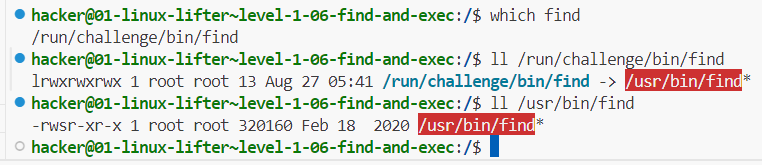
- see here for find stuff
find / -name random_cant_flag -exec cat {} ';'worked
.07 - return code
$?is the return code of the last executed command- range 0 to 255
.08 - python
- SUID on python this time
.11 - search me
/challenge/tester.shis printing/flagbut the file is missing/challenge/cphas SUID bit set- preliminary find revealed a possible file deep in
/tmp find /tmp/that/full/path -name flag -exec /challenge/cp {} /flag ';'
.12 - hash it out
- used online tool to generate SHA256
.13 - hash full
- here we go
- a-z, 6 spaces, so 26^6 possibilities
- plaintext is 6 letters, so 48 bits. hash is SHA256 so 256 bits.
- storage per line:
<hash><plaintext>that's 304 bits, 312 if including newline character - total storage exceeds 11GB!!
- refinement 1: 256-bit hash is pretty unique. if we cut down on the portion of the hash stored, we should be able to save a ton of space while only slightly increasing the margin of error. let's assume plaintext has to be stored entirely for now, so total per line is 184 bits.
- eh fk it, just generated all permutations. 22GB storage, 20 min to generate, search using VSCode search took a few more minutes
Project 02 Unwinding Binaries (Reversing)
.01 - looking inside
- not sure how to use ghidra, didn't seem to work either
angr decompile /challenge/runrevealed astrcmpwith the key, ez
.02 - the mangler
- 'mangling' is just subtracting 3 from the char's ascii value. so just add 3 to the key
.03 - XOR plus
- mangling is adding 3 then XOR with 2. so just XOR with 2, then subtract 3
lab 2a.02
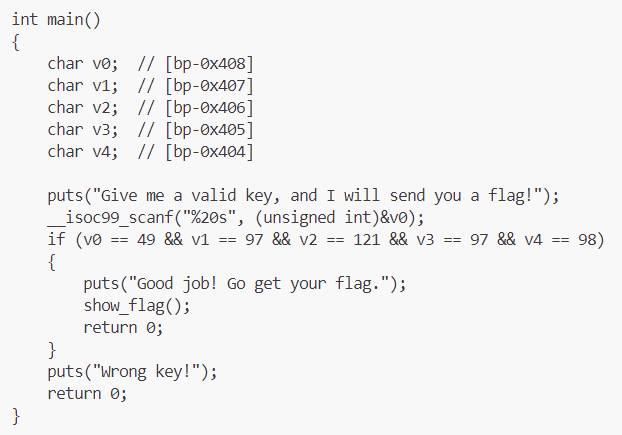
- ascii values
.04 - solve for x
- NOTE: angr screwed up, and gave an incorrect result (== instead of !=)
- use ghidra (GUI) or dogbolt for binaries under 2MB
- anyway, math solving:
- we get a few eqns:
- v1 = v0 - 24223
- v3 = 5v2 - 129519
- use these eqns to reduce from brute-force 4 nested loops to 2 nested loops
- then verifying the rest gets us one soln
- we get a few eqns:
- runtime < 3 seconds
.05 - extra verification
- angr just straight up hangs lol
- holy sh*t so many if statements
- boils down to byte by byte, check 1 or 0, check +ve or -ve (MSB)
- 00 - 00110111
- 01 - 01000111
- 02 - 01000011
- 03 - 01010110
- 04 - 00110100
- 05 - 01010010
- 06 - 01011010
- 07 - 01001001
- 08 - 01000001
- 09 - 00110100
- 10 - 01011001
- 11 - 00111000
- 12 - 01111001
- 13 - 00110011
- 14 - 01110011
- 15 - 01001000
- 16 - 00110101
- 17 - 00111000
- 18 - 01101010
- 19 - 01010111 (binary ninja and hex-rays disagreed on this, binary ninja was right)
- could have automated this smh
.06 - extra verification II
- first ordered all if statements to get bitwise order of the string (hell.)
- for result to be 0 at the end, just don't modify it at all
- so for each if statement, check which of 0/1 makes it false (find and replace ftw)
- ascii string is 67kW6YnKvTpaqoBX1F8l
- really should have automated this
.07 - binary labyrinth
- omg it's literally labyrinth navigation, using wasd keys LMFAO
int M[12][12]={
  { 1, 0, 1, 1, 1, 1, 1, 1, 1, 1, 1, 1},
  { 1, 0, 1, 0, 0, 1, 0, 1, 0, 0, 0, 0},
  { 1, 0, 0, 0, 1, 1, 0, 1, 0, 1, 0, 1},
  { 1, 0, 1, 0, 1, 1, 0, 1, 0, 0, 0, 1},
  { 1, 0, 0, 0, 1, 0, 0, 1, 0, 0, 1, 1},
  { 1, 1, 0, 1, 1, 0, 0, 0, 0, 0, 1, 1},
  { 1, 1, 0, 1, 1, 0, 1, 1, 1, 0, 0, 1},
  { 1, 1, 0, 0, 0, 1, 1, 0, 0, 0, 1, 1},
  { 1, 1, 0, 1, 0, 1, 0, 0, 1, 1, 1, 1},
  { 1, 1, 0, 1, 0, 1, 1, 0, 1, 1, 1, 1},
  { 1, 1, 0, 1, 0, 0, 0, 0, 1, 1, 1, 1},
  { 1, 1, 1, 1, 1, 1, 1, 1, 1, 1, 1, 1}
};
- 1s are landmines
- start from row 1, column 2 (x=1, y=0)
- goal is row 2, column 12 (x=0xb, y=1)
- ssssdsssddsssdddwwwddwwwwdwwd
- lol
Project 03 Hacking Network Highways
.01 - netcat
nc 10.0.0.3 31337
.02 - netcat listener
nc -l 31337
.03 - nmap and netcat
nmap 10.0.0.0-255 # found in .142
nc 10.0.0.142 31337
.04 - nmap in parallel and netcat
-snfor ARP ping scan - no ports just discover host--min-parallelism 10for at least 10 probes at a time- consider using
-T4or-T5timing templates - checked
10.0.0.0/19- only us at .210.0.32.0/19- nothing10.0.64.0/19- 10.0.90.244 and port is 31337 as expected. stopped here
.05 - tcpdump
tcpdump -A 'tcp port 31337'-Ato print content as ASCII
.06 - tcpdump and flow
- inspecting the /challenge/run python script, we see that it's sending one character at a time, after encoding them
tcpdump -s 65535 -nntA 'tcp port 31337' -w /home/hacker/my_pcaps/3.06.pcap-sto grab full packet (?)-nnto avoid resolution of hostnames or port numbers-tto exclude timestamp-Ato print content as parsable ASCII. important!!!
- then we use scapy to read the packets, skip alternating duplicates, decode, and form a single string
- ehh i messed up something but whatever
.07 - mimic and listen
ip addr add 10.0.0.2 dev eth0assign the address to us, fakenc -l 10.0.0.2 31337
.08 - ether scapy
- jfc
- ALWAYS be explicit and define the src addresses
- didn't define the src MAC addr, so packets kept going thru
loinstead ofeth0 - too stupid to realize it in time too
- anyway, get current MAC addr of
eth0 - craft Ether packet to given dest addr with type
0xFFFF srp(pkt, iface='eth0')
lab 3a was chill, no notes
.09 - IP scapy
- similar
- set IP addr with
ifconfig eth0 10.0.0.2 - add l3 with src and dest IP addr,
proto=0xFF - since we need MAC as well, use
srp, notsr
.10 - TCP scapy
- similar
- again, set IP addr
- add l4 with src and dest TCP port,
flags=0x1Fto set ACK (0x10), PSH (0x08), RST (0x04), SYN (0x02), FIN (0x01) flags srpagain
.11 - TCP handshake
- send SYN with specified seq and ack numbers - 31337 both
- get SYNACK
- has ack of 31338, which will be our next syn
- has random syn, add 1 to get next ack
- send ACK with next syn and ack numbers
.12 - ARP scapy
- meh, arp opcode is 2
.13 - ARP spoofing
- meh, just crafting ARP and tcpdump
lab 3b was chill, no notes
.14 - MiTM ARPing
- shit's getting too easy, let's not look at /challenge/run
- first, get target's macs, then arp spoof
- we don't have NET_ADMIN, so can't set ip_forward in sysctl to control MITM directly,
- first, capture packets, check raw loads
- we observe that a sequence repeats:
- 10.0.0.3:31337 sends a command: "SECRET", to 10.0.0.4 at a random port
- note: how does 3 know which port to send to?
- [after 3d] idiot, 4 opens the tcp handshake
- note: how does 3 know which port to send to?
- 4 responds with a secret, it's in ascii?
- 3 sends a list of available (?) commands - echo, flag, and then asks for a command
- 4 responds with echo, and sends "Hello, World!"
- 3 echoes it back
- 10.0.0.3:31337 sends a command: "SECRET", to 10.0.0.4 at a random port
- connection closes, repeats with another randomized port for 4
- note that 3 sends a secret and a list of commands that includes a flag command
- craft a packet masquerading as 4, with the flag command, wait for a secret to arrive and put it in the packet
- [after 3d] idiot, read the code, you don't need the secret, just hijack the connection
- in the time it takes 3 to do the legitimate echo from 4, we could probably send the flag command to 3 and have it processed in the same ephemeral connection
- let's try
lab 3c was chill, no notes
lab 3d
.2 - mitm arping
- same as 3.14, approaching this first for deadline
- client at 3.13.37.4, random port
- server at 3.13.37.3, port 1992
- flow:
- TCP handshake:
- client -> SYN -> server
- server -> SYNACK -> client
- client -> ACK -> server
- secret is sent:
- server -> PUSHACK -> asks for secret -> client
- client -> ACK, then PUSHACK -> secret string \n-> client
- server -> ACK, then PUSHACK -> secret confirmed -> client
- at this point, inject BACKDOOR packet before the actual client
- client -> ACK, then PUSHACK -> ECHO: -> server
- after backdoor, send a FLAG packet
- TCP handshake:
going back to continue 3.14 with this understanding
- [after 3d] updated understanding
- client at 10.0.0.4, random port
- server at 10.0.0.3, port 31337
- flow:
- TCP handshake:
- client -> SYN -> server
- server -> SYNACK -> client
- client -> ACK -> server
- secret is sent:
- server -> PUSHACK -> asks for secret -> client
- client -> ACK, then PUSHACK -> secret string \n-> client
- server -> ACK, then PUSHACK -> list of commands -> client
- at this point, inject FLAG command before the actual client
- client -> ACK, then PUSHACK -> ECHO -> server
- TCP handshake:
Project 04 Hijacking Binary Power (Pwning)
- seems we have access to the source code, and we're given a suid-set executable
.02 - exec them all
- title helped
exec -a <passwd> /challenge/run
.03 - altering arg[0]
- +3 lops off first 3 chars
.04 - symmer
- symlink /flag to ~/flag
.05 - when is a secret not secret
.10 - somewhere over the rainbow
- online tool
.11 - byte compare
- this strncmp takes the lower length (doesn't take null tho), so just give it a single byte
- only 256 possible values, bruteforce
for i in $(seq 0 255); do
  i_chr=$(printf "\x$(printf "%x" "$i")")
  /challenge/run $i_chr
done
.12 - symmer in time
- 5 second window
- initially have a dummy
~/flag, run the challenge, within 5 seconds delete it and create it as a symlink to/flag
.13 - time after time
- 2 second window
- creates tmp files, writes target to one, sleeps for 2 secs, then reads from it and compares with passwd checksum
- have
umask 002 ; echo <checksum> > /tmp/hash_output_1000_<randnum>in one shell ready for tab completion of the random number part - run
/challenge/run somethingin another shell, then run the above
.14 - controlling your path
- make sure PATH is set so that it uses your program
- don't specify a shell so that it uses
/bin/sh- see here"If the process image file isn't a valid executable object, the contents of the file are passed as standard input to a command interpreter conforming to the system() function. In this case, the command interpreter becomes the new process image."
- i assume the command interpreter that gets used has the SUID bit
.15 - blind leading the blind
- basically, stdout and stderr for the child are set to
/dev/nullso instead of spawning root shell, usecat flag > outputand read output
.16 - arg wars VI - return of the hacker
- decompiler showed set of filtered characters, quotes and backslashes are not there
- also .17 checks for backslashes, so i assume backslashes solves this
- but i got stuck, TA said try the 'prequels' first then come back lol
lab 4a.1 - easy overflow
- standard buffer overflow vuln
- gdb shenanigans
- shift-ctrl-@ inserts a null character it seems (remember for .16)
- enough gdb, let's move to big guns - pwntools
- checksec says no stack canary or PIE
- all g then
- calculate offset from vulnerable variable location to saved RIP(return instruction pointer) location
- get address of target function to execute
- craft payload accordingly
lab 4b.1 - overflow + shellcoding 1
- buffer overflow vuln
- have to write and inject shellcode
- checksec says protections are disabled
- pwntools generated shellcode for
/bin/sh:- push
/bin/shto stack, setebxto this address - setting argv - push
shnull-terminated (hv to use XOR trick to null-terminate, which isn't necessary for memcpy tho), setecxto this address - setting env - XOR out
edx - executing execve - syscall
execve
- push
- so
- get shellcode on the stack
- calc offset from rsp to start of shellcode
- rsp is obtained at runtime, program outputs it
- if we put shellcode in the vulnerable variable, we can use its location to store shellcode since its not being modified
- and in this case, rsp=variable location cuz last variable on stack
- add offset to rsp to get shellcode location
- put that as target rip
- padding in between
- boom
lab 4b.2 - overflow + shellcoding 2
- ummm
- apparently the difference was replacing memcpy with strcpy
- memcpy doesn't care about null bytes, strcpy does
- but since i used robust shellcode from pwntools ahaha....
- it already took care of that
- so 4b.1 solution applied here too
.19 - pile on
- unsanitized input to system() - basic shell injection
.20 - | escape from cmd
- input escaped by double quotes
- just tried randomly, this worked to inject:
/challenge/run ';`lint`'
.21 - substitute commander
- checked for double quote in input, so prev soln worked here too
.22 - arg wars I - the phantom command
- find command
- injection vuln, only checks for semicolon
- so same works again, replace with
&&
.23 - arg wars II - attack of the chars
- checks for dollar in addition (variable substitution)
- so same works again
.24 - arg wars III - revenge of the tick
- ah now the backtick has been filtered. but not the ampersand!
/challenge/run 'test && lint'
.25 - arg wars IV - a new hole
- now the source is not available, hv to decompile
- we see that now ampersand has been filtered out as well
- lets try quotes to have find do an exec
/challenge/run test" -exec /home/hacker/lint {} +"
.26 - arg wars V - the system strikes back
- pipe symbol now added to filter
- luckily we didn't use that
.27 - overflow gods
- buffer overflow vuln
^Ais ASCII 1
.28 - the power of a god
- just overflow again, doesn't matter if stack or global var
.29 - direct is best
- we get direct access to set any value on stack - control flow vuln (lol)
- set saved rip to target function address
.30 - stack direct
- similar access. no source code
- decompiled, found a
flag==0xcafebabecheck to execute a root shell
.31 - data direct
- even more direct access - no addition of address, just direct address control (lol)
- set flag to
0xdeadfeed
lab 4b.3 - overflow + a defense
- similar to 4b.1 and 4b.2
- but here we dont have RSP so we cant point RIP to it
- instead there's a function that has
jmp *%rsp - so first, pad the vulnerable stack buffer upto the saved RIP's address
- put that function's address in it
- now, remember that when a function returns, it pops its stack
- so we need to put our shellcode after this saved RIP's location
- that way, when the current function returns into the target function, the target function's RSP will point to the shellcode
- boom
lab 4c.1 - rop
- buffer overflow vuln, but NX is enabled on stack
- ROP time
- we need:
- location of a string "/bin/sh" in rdi (path)
- 0 in rdx (argv)
- 0 in rsi (envp)
- 0x3b in rax (execve)
- finally run syscall
- ASLR is enabled, but program gives us the address of libc
- from pwn, we have ROP(ELF(libc.so path)) to get ROP gadgets from libc
- other tools exist, like ROPGadget.py, one_gadget, ropium
- find necessary gadgets and args
- some might not exist in the exact form required, maybe some baggage is attached, or a roundabout way is needed (xor instead of directly loading, etc)
- boom